Maggi Hiring Workflow Agent
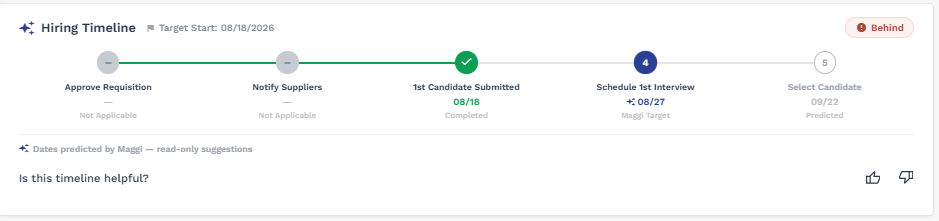
The Maggi Hiring Workflow Agent is an AI-powered assistant that guides hiring teams through each stage of the contingent workforce hiring timeline  from requisition to placement  reducing manual coordination and helping accelerate time-to-fill. Using historical time-to-fill (TTF) data, the agent suggests target dates for each stage of a staffing request and displays them as a visual timeline directly on the request.
The Hiring Workflow Agent must be enabled for a client organization (). As with other Maggi agents, Enable for MSP must be turned on before Enable for Client Managers can be enabled. See Maggi.
Hiring Timeline Widget
- In the Manager/Hiring Manager view, the widget appears on every tab of the Request page.
- In the MSP view, the widget appears on the Details tab of the request.
- The widget is hidden only for Cancelled requests; it remains visible for Closed requests and all other statuses.
- The widget is shown for all staffing type requests regardless of Approval Workflow or Supplier Notify configuration. If a stage's underlying configuration isn't enabled for the client, that section is either dropped from the timeline or labeled Not Applicable rather than left blank.
Auto-Recalculation
If you change a request's Target Start Date, all suggested milestone dates on the Hiring Timeline widget automatically recalculate to match. No manual updates are required.
Compressed Timeline Warning
If the requested timeline is tighter than what historical data suggests is achievable, the widget displays a Compressed Timeline warning. This warning can appear regardless of the request's current status, including requests that are otherwise On Track.
Feedback
Use the thumbs up/down buttons on the Hiring Timeline widget to provide feedback, along with an optional free-text field for additional detail.