Maggi Workflow Agent
The Maggi Workflow Agent is a request creation agent that can automatically generate some job details based on historical job data. The feature supports Staffing and Payroll job description generation and Project scope and deliverables generation. It can also be used to find and reuse previously created requests.
For evaluation, the Workflow Agent can consider a supplier organization's data to create insights on strengths and weaknesses. Generated insight details can be viewed when selecting suppliers in the Sourcing step of the Create Request wizard. For quotes, the agent can use the project/SOW details to determine a score or quote level alignment.
The Workflow Agent must be enabled for a client organization (). You can enable this agent for the MSP, or the MSP and client manager user. Additional Workflow Agent capabilities can be enabled as required. See Maggi.
Request Refinement with Workflow Agent
When using the Create Request wizard, and if the Workflow agent is enabled, you can click the Refine with Maggi button in applicable areas of the wizard to help you generate content. The Workflow Agent uses historical inputs to suggest details that can be used in the request. See the applicable section in the Create Request wizard documentation.
Reuse Previous Request
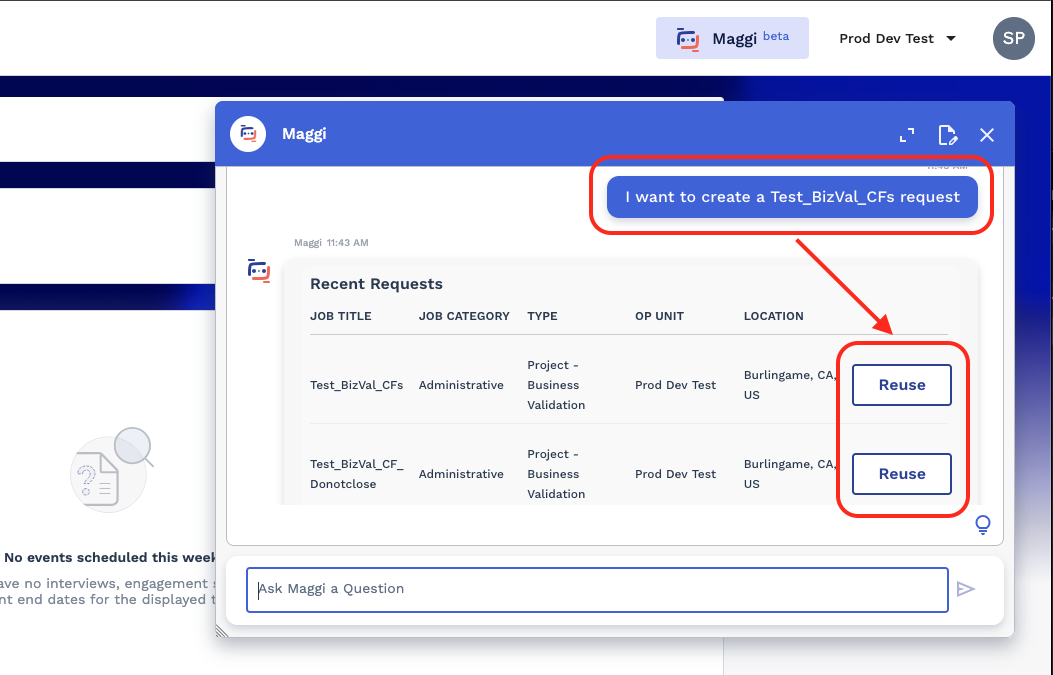
Click Reuse next to the request. The system creates the request. You must complete and submit the new request details.